The sharp sensor that I am using is this http://www.pololu.com/catalog/product/136
I think that's the one I used, if my memory is right . . .
I've kept my cell size as 20x20 cm2 as the size of my robot is small. The problem that I am face if I point the sensor in a cell direction is that the width of the ir beam is 6cms at 20cms from the robot. The sensor detects objects at other cells too.
The simple way to avoid this is to decrease your scan angle. Or if you don't mind complicating things and slowing down the scan, you can do fancy trigonometry to figure out where everything is during the scan. I preferred to keep it simple in my code.
Moreover, the input voltage from the sensor increases if the beam detects an edge far away from the robot and hence records the object to be present in the cell nearby (I really don't know what's wrong and I suspect that the sensor might be at fault as I soldered the wires to the back of the sensor as I couldn't get 3 pin jst wires anywhere).
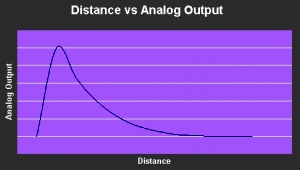
Your output should look like this below chart. The peak represents the minimum distance the sensor can detect, in which case is 10cm for your sensor. So if you're trying to detect something less than 10cm in front of your robot, the reading will be wrong.
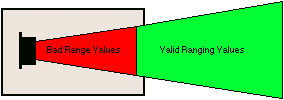
If that's the case, move the sensor back on your robot like this:
Or you can use two sharp IR, one model for long distance scans and the other model for very short distance scans.
I have found a crude way to detect obstacles and it works most of the time but the motion of the servo is quite jerky and not continuous as the one in your video 
The jerkiness is probably because you have a large delay between each scan angle. A single accurate SharpIR reading takes up to 40ms, so jerkiness is hard to avoid. A scan that's too fast won't be very accurate. I had noticeable errors in my fast scans, but nothing major.
Another question is does your code consider objects that appear while the robot is moving from one cell to another?(something like a bump sensor as I saw your robot stop in the middle when you placed a cereal box before it).
My code didn't account for it simply because that complicated the code. I like to keep things simple. But if you had time and your basic code already works, I'd encourage you to try it. The advantage of having it detect objects while the robot is in motion is that the robot doesn't need to stop-start-stop-start-stop-start-stop-start.

